 Menu
Menu
For iOS apps that are not sold through the app store, we need the Unique Device Identifier (UDID) of the device you’re going to use or test it on. It’s a code consisting of 40 characters. You need to follow these steps to retrieve the UDID:
- Connect the device to your computer.
- Open iTunes (if it doesn’t automatically).
- Click the device icon in the navigation bar (left of ‘Library’).

- Click on the serial number.
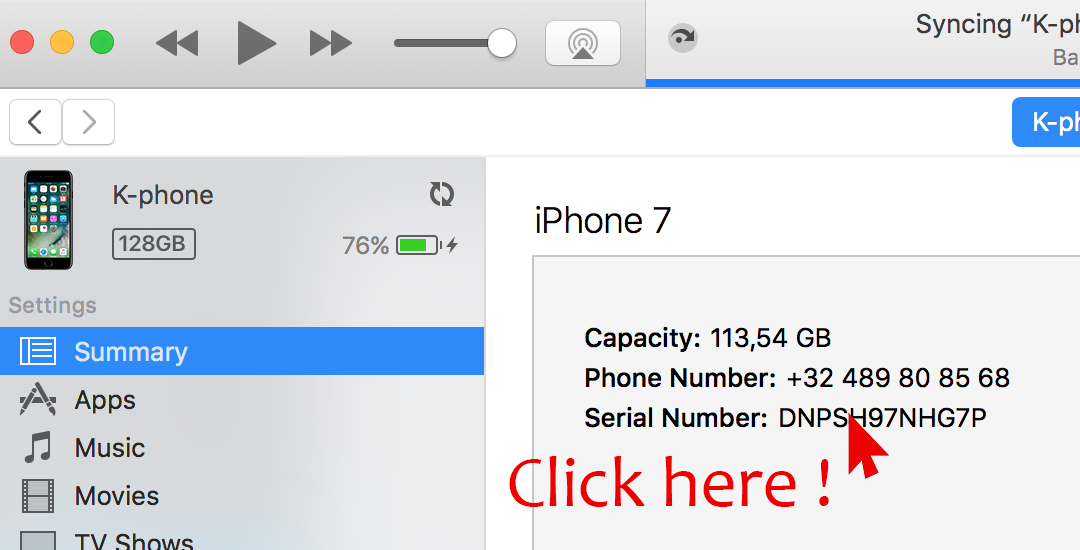
- You will see the UDID.
- Control-click (Windows: right-click) and you will be able to copy the UDID.

- We need this number as well as the name of the device.
- After you send this to us, we’ll let you know if we made a build that’s ready for your device!
Another way of finding out your UDID uses Diawi. You can read a tutorial here!